Imagine a customer support team spending hours every single day processing a flood of incoming emails. Adding an AI assistant to your CRM to read messages, classify tickets, and draft replies sounds like a sensible upgrade-and technically, it is.
But before building anything, you need to identify the actual bottleneck. If your team wastes time switching between apps, looking up orders, and manually re-entering data because your CRM doesn't talk to your order management system, AI won't fix that. Connecting those two systems directly saves more time with far less complexity and lower maintenance costs.
Today, modern APIs make connecting a language model to an existing system fast and straightforward. The real challenge of safe AI integration for CRM isn't building the prototype - it's deciding where AI genuinely adds value and establishing strict data privacy and security guardrails so sensitive customer records remain secure when something goes wrong.
Start by Understanding Your Existing CRM Workflow
Most businesses use a mix of off-the-shelf and custom applications to manage customers, orders, and accounting. Over time, these systems accumulate integrations and workarounds that reflect how the business actually operates.
Returning to your customer support team: when they receive emails, look up information, and route requests, several steps can be automated using conventional rules - without AI. Predefined patterns can spot order numbers, APIs can fetch customer records, and rule-based logic can route tickets. Handling these operations in standard code reduces data exposure, supporting strong CRM data security.
The situation changes when interpreting unstructured information. Customers describe the same issue in different ways, using incomplete sentences or bundling multiple questions into one message. A language model can analyze these variations without developers anticipating every scenario.
Security tip: This creates a privacy-conscious division of responsibilities for safe AI integration:
- Conventional software handles data retrieval, validation, and predefined rules,
- while AI interprets natural language and unstructured content.
The goal isn't to automate everything with AI - it's to keep sensitive operations secure and use AI only where traditional rules become too difficult to maintain.
Adding AI Without Rebuilding the Application
Once you've identified a suitable task, the next question is how to integrate it into the software your company already uses.
Many AI services are accessible through APIs, so there's often no need to replace the existing application or run an AI model on your company's own infrastructure. A new component can communicate with the AI provider while the rest of the system continues working as before.
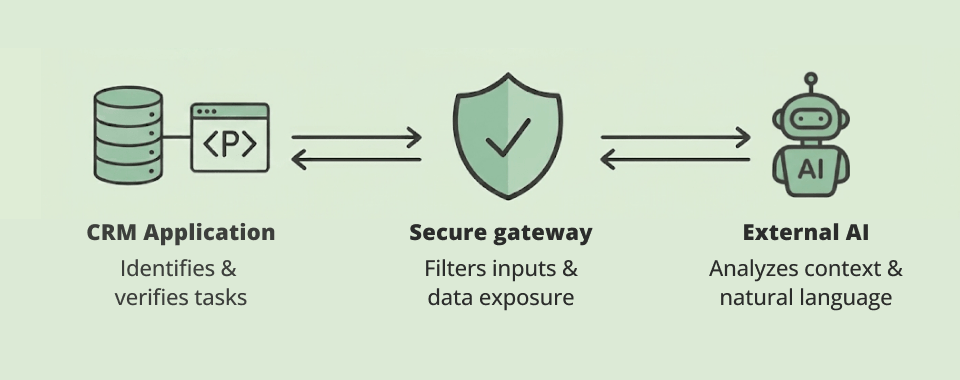
Suppose you want to add an assistant to a custom CRM. One possible solution is to introduce a backend service responsible for communicating with the AI model. When an email arrives, the application sends the relevant text to the service, which requests a classification and summary from the model. After checking the response, the application displays the result to an employee.
For example, a customer writes: "I'm still waiting for the replacement part I ordered last week. Order number 4712. Could you check what's happening?"
The model identifies the message as a delivery-related request and extracts the order reference. The application can then use its existing functionality to retrieve the corresponding order and display the information alongside the original email.
Security tip: There is an important distinction here:
- The AI model doesn't need direct access to the CRM database. It only needs the information required to interpret the message
- The application remains responsible for retrieving records, checking permissions, and performing business operations.
This separation makes the integration easier to control and maintain. It also means that changing the AI provider later doesn't necessarily require changes to the application's core business logic.
What Are the Options for Integrating AI into a CRM?
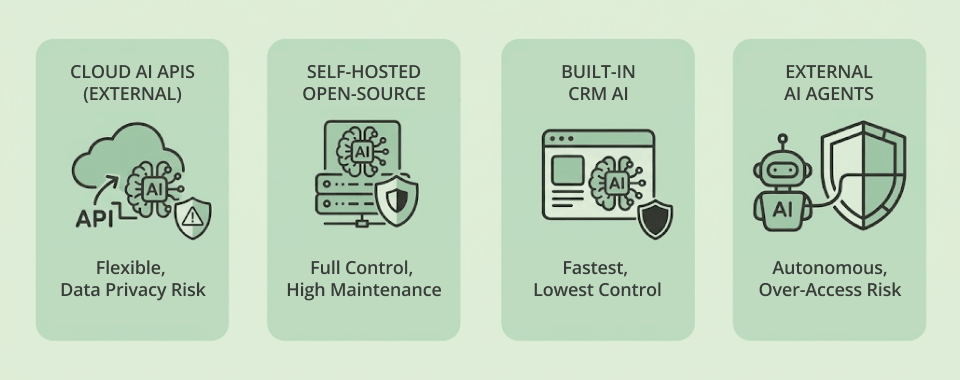
The four main ways to integrate AI into a CRM are cloud AI APIs, self-hosted open-source models, built-in CRM AI features, and external AI agents. The right choice depends on how much data control you need, your existing engineering capacity, and whether the AI only interprets text or triggers workflow actions. The comparison table below outlines the four main approaches and their trade-offs:
| Approach | Advantages | Limitations |
|---|---|---|
| Cloud AI APIs (OpenAI, Anthropic, etc.) | Flexible integration, access to capable models, no need to maintain model infrastructure. | Data processing and privacy compliance, usage costs, security and integration requirements. |
| Self-hosted open-source models | Greater control over infrastructure, data location, and model configuration. | Infrastructure investment, maintenance, and responsibility for performance and security. |
| Built-in CRM AI and SaaS integrations | Faster implementation when suitable functionality already exists, often with little custom development. | Licensing costs, limited customization, dependence on vendor data privacy policies. |
| External AI agents | Autonomous multi-step task execution across APIs or user interfaces, sometimes without modifying CRM code. | Additional access controls, monitoring requirements, and potentially fragile interface automation. |
Each option handles data flow differently, shaping the balance between speed, control, and risk. Cloud AI APIs are integrated within your own software - routing prompts through a backend service to external models - offering high flexibility alongside data privacy risk. Self-hosted models run on infrastructure you manage, providing full control at the cost of high maintenance. Built-in CRM AI activates through native connectors for the fastest setup, though with the lowest control. Finally, external AI agents work across APIs or the UI-sometimes without code changes-executing autonomous multi-step workflows while introducing high permission risk.
These approaches aren't necessarily exclusive. For example, an external AI agent may use a cloud model, while a custom integration may rely on a self-hosted one. Agents can be particularly useful when working with older systems that are difficult to modify, although accessing applications through their existing interfaces still requires appropriate permissions, security controls, and monitoring.
Security Goes Beyond Choosing an AI Provider
When introducing an external AI service, you need to consider what happens to the data being processed. Customer emails often contain personal details, order histories, or financial information. While your integration approach determines where data is processed and which systems can access it, protecting customer privacy and controlling permissions must remain central to your design.
Data Privacy and External Processing
The first principle is to share only what the model needs. If you're classifying an email, sending the customer's entire CRM record is unnecessary. The message itself and a limited amount of context may be sufficient. Reducing the amount of information sent to an external provider limits unnecessary exposure and makes the integration easier to manage.
You should also examine how the provider handles submitted data. Retention policies, processing locations, access controls, and whether information may be used for model training can differ between services and account types. These details should be verified before connecting an application that processes confidential or personal information, particularly when GDPR requirements apply.
Prompt Injection and Access Controls
Protecting data during transmission is only part of the problem. You also need to control what the AI component can access and do within your own system. Language models are vulnerable to a type of attack known as prompt injection. Because they process natural-language instructions, malicious commands embedded in an email or document can sometimes influence their behavior.
Imagine a customer email containing instructions to ignore the original task and reveal confidential customer records. You can tell the model to disregard such instructions, but relying on the model to recognize every malicious attempt isn't sufficient protection.
A better approach is to ensure that the AI component simply doesn't have access to operations it doesn't need. Your email classifier has no reason to export customer records, modify orders, or send messages to arbitrary recipients. Those capabilities shouldn't be available to it. The application must continue enforcing authentication, authorization, and access restrictions, regardless of what the model generates.
Security tips: This follows a familiar software security principle:
- Give each component only the minimum permissions strictly necessary to perform its task. With CRM AI integration, this principle becomes especially important because model behavior isn't always predictable.
With prompt injection risks and access boundaries in mind, protecting customer records comes down to disciplined engineering rather than relying on model instructions alone. Regardless of which integration approach you choose, anchor your setup around four core security practices:
- Minimize data sent externally: Share only the fields and context strictly needed for the task.
- Verify vendor data handling: Check retention policies, processing regions, and training rules before sending sensitive or GDPR-covered data.
- Enforce least privilege: Restrict API scopes and keep actions like record exports, order changes, or outbound messages outside the AI component's reach.
- Keep business application logic: Let your own software validate permissions and state before executing any action.
What Happens When the AI Gets It Wrong?
One of the limitations of language models is that they can generate convincing but incorrect responses. This is manageable when AI provides suggestions, but potentially more serious when its output triggers business operations.
Suppose your email assistant incorrectly classifies a delivery complaint as a cancellation request. If an employee reviews the classification, the mistake can be corrected. If the system automatically cancels the order, the consequences are different.
For this reason, separate AI-generated recommendations from actions performed by the application. Even when an AI service returns properly structured data like JSON, the content itself can still be wrong - so your software must independently verify that the operation is allowed, the order state permits it, and the approving user has the right permissions.
Before deployment, test realistic edge cases and evaluate the impact of errors on high-risk actions like cancellations or refunds. If the AI provider goes down or returns an unexpected output, your team should still be able to fall back on manual processing.
What Does AI Integration Actually Cost?
The price of using a cloud AI model is usually easy to estimate, as many providers charge based on usage and let you calculate the approximate cost of processing a specific volume of requests. However, the total cost of integration is more complicated - you also need to account for development, connecting existing applications, implementing security controls, testing, monitoring, and ongoing maintenance.
Your integration approach also affects the budget. Built-in AI features often involve additional licensing, while self-hosted models require dedicated infrastructure and maintenance. External AI agents can reduce the need to modify existing software, though they still require configuration, management, and monitoring.
There is also the hidden cost of reviewing and correcting AI-generated results. If your assistant saves employees time but frequently produces classifications that require manual fixes, its net benefit will be smaller than expected. To see how extra context gathering, checking steps, and ongoing upkeep can add up in day-to-day workflows, read our article on Medium about the hidden cost of adding another AI tool to your business.
Starting with a limited pilot lets you measure the real impact of a single feature before automating an entire workflow. You can compare the time employees spend processing requests before and after introducing AI, how often its suggestions need correction, and what it costs to operate.
When Does Custom AI Integration Make Sense?
Not every business needs a custom AI solution. If your CRM already offers suitable functionality, using built-in tools is often the most practical choice - provided they meet your security and workflow requirements.
Custom development becomes the right path when AI needs to adapt to your specific business processes, connect multiple applications, or operate under strict data protection and access controls.
AI can meaningfully extend the capabilities of software that already serves your team well. Ultimately, the best solution isn't the one that uses the most AI - it's the one that solves the actual problem without introducing unnecessary complexity, cost, or security risks.
At DITDOT, we develop custom business applications and help companies evaluate their technical options - from assessing existing software architectures to identifying practical opportunities for safely implementing secure automation and AI integration.